

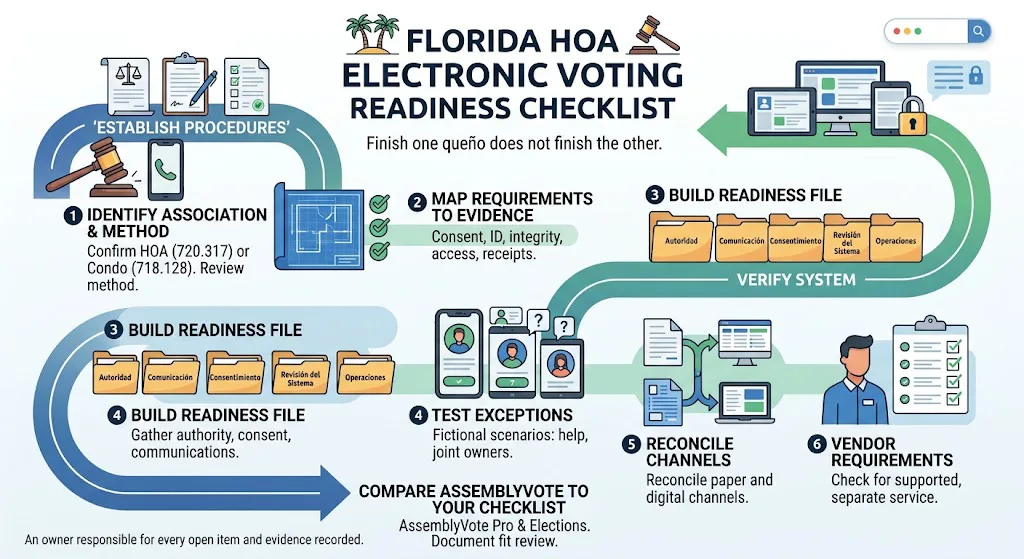
A Florida HOA planning its first online vote has two projects to complete: establish the right association procedures and verify that the proposed system supports them. Finishing one does not finish the other.
Use this Florida HOA electronic voting checklist to organize a readiness review with your board, community association manager, legal adviser, and proposed provider. Keep an owner responsible for every open item and record the evidence used to close it.
Identify the association and the voting method
Start by confirming whether the community is governed as a homeowners' association or a condominium association. Do not reuse another community's checklist solely because both organizations have a board and an annual meeting.
Florida addresses internet-based voting for HOAs in section 720.317. Condominium electronic voting is addressed separately in section 718.128. Have the association's adviser review the current text, related rules, governing documents, and the specific voting method proposed.
Map the HOA requirements to evidence
Section 720.317 addresses member consent, identity authentication, device communication testing at least 14 days before the voting deadline, vote integrity, receipts, ballot access for review, and board authorization. Its identity-separation provision for director elections applies when the bylaws provide for secret ballots. It also addresses quorum treatment and consent and opt-out procedures.
Treat that as a starting map, not a complete legal checklist. Ask your adviser to identify every applicable requirement and your provider to demonstrate how its proposed configuration addresses each technical item.
Build a readiness file
Organize preparation into five folders or sections:
- Authority: governing documents, approved resolutions, and the advice used to establish the process.
- Communication: notices, distribution records, instructions, and the calendar approved for the event.
- Consent: the approved method of collecting, checking, and recording participation choices and changes.
- System review: vendor responses, observed tests, identified gaps, and written commitments.
- Operations: assigned roles, issue handling, closure steps, and record custody.
This is a suggested administrative structure. The content and retention period should follow the association's actual obligations.
Test exceptions before inviting owners
A successful test ballot from the manager's laptop is only the beginning. Build a short rehearsal using fictional participants and the actual types of devices owners will use.
Include someone who cannot open the invitation, joint owners with one voting interest, a person requesting help, and a participant who changes devices. Ask how each exception is resolved without creating duplicate voting rights or exposing a confidential selection.
Record the question, the expected behavior, the observed behavior, and the person responsible for an unresolved issue. A failed rehearsal is useful if it exposes a problem early enough to fix.
Keep parallel participation channels organized
If the approved process includes paper participation or another permitted channel, define how the channels reconcile. Who receives submissions? Who checks eligibility? How is a possible duplicate flagged? Which approved rule determines the accepted submission?
Never improvise these decisions after seeing the likely result. Publish the appropriate instructions before voting opens and keep private information out of general meeting communications.
Require a specific vendor answer
Send vendors a list of requirements and request answers in a consistent format: supported in the proposed configuration, available through a separate service, requires association action, or unavailable. Ask for demonstrations and documentation where appropriate.
Avoid treating a generic statement such as “secure online voting” as evidence that every statutory requirement has been met. Our HOA voting software buyer's guide provides a broader demonstration script.
Review AssemblyVote against your checklist
AssemblyVote Pro supports meeting operations. AssemblyVote Elections serves institutional election workflows. Review both products against your association's requirements.
Request a documented fit review before using either product for a Florida statutory voting process. This article does not certify a product or substitute for advice about your association.
Frequently asked questions
Does buying voting software authorize our HOA to vote online?
Treat software procurement and association authorization as separate workstreams. Have the responsible adviser confirm the actions needed for the proposed process.
Can we copy a condominium association's procedure?
Use it as a source of questions, not as approval. The association type and applicable requirements need their own review.
Next step: Request an AssemblyVote discussion with your event description and requirement list so technical fit can be evaluated before launch.